
Donum: Free Gift with Purchase · Shopify app
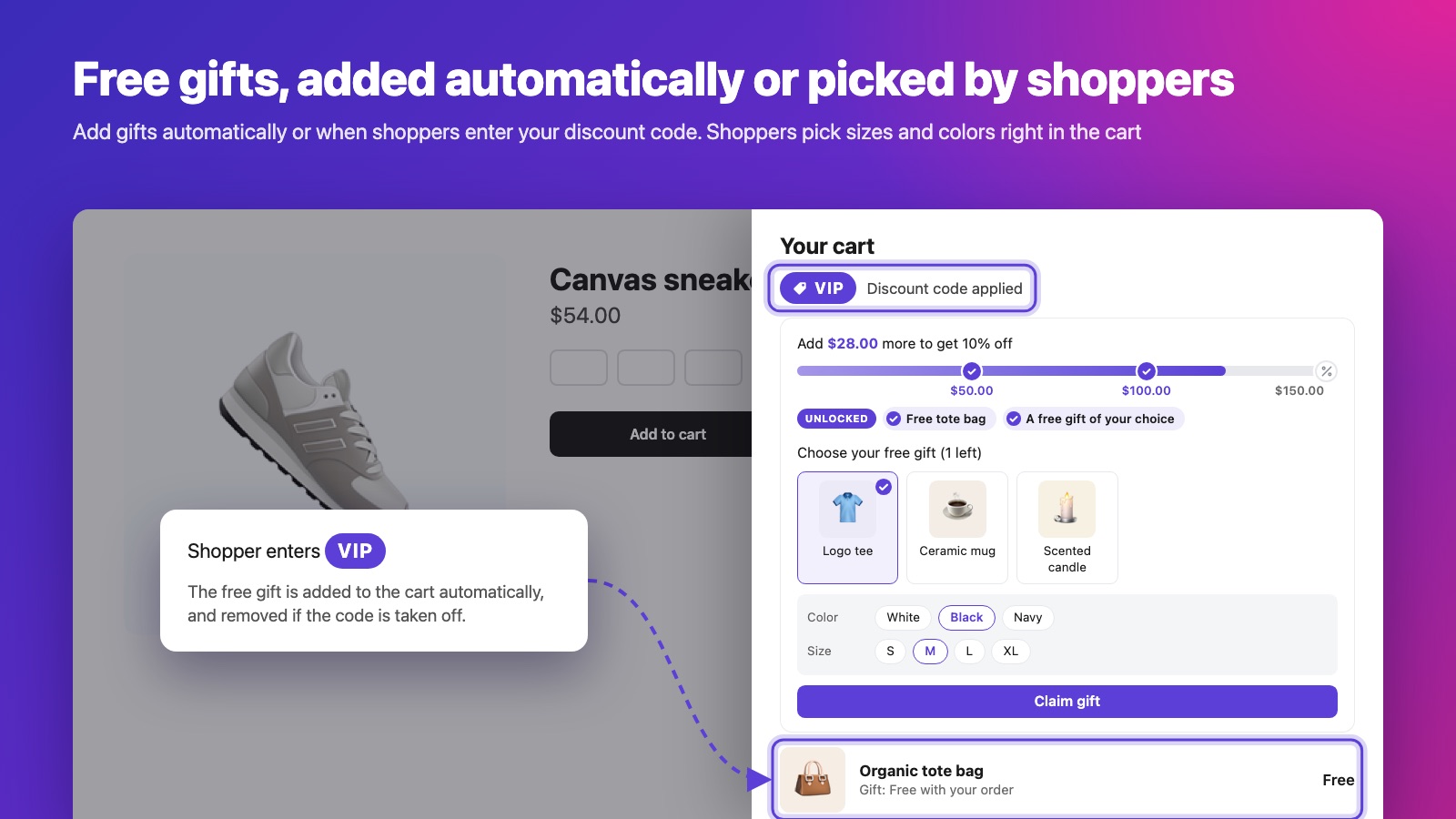
Reward bigger carts, automatically.
Free gifts that add themselves to the cart (or that shoppers pick, down to size and color), add-ons at a special price, tiered discounts and buy X get Y deals, with a progress bar that shows shoppers what to add next. Online, and at the counter with Shopify POS.
Updated Nov 29, 2026: Product cards for single add-ons. What's new →
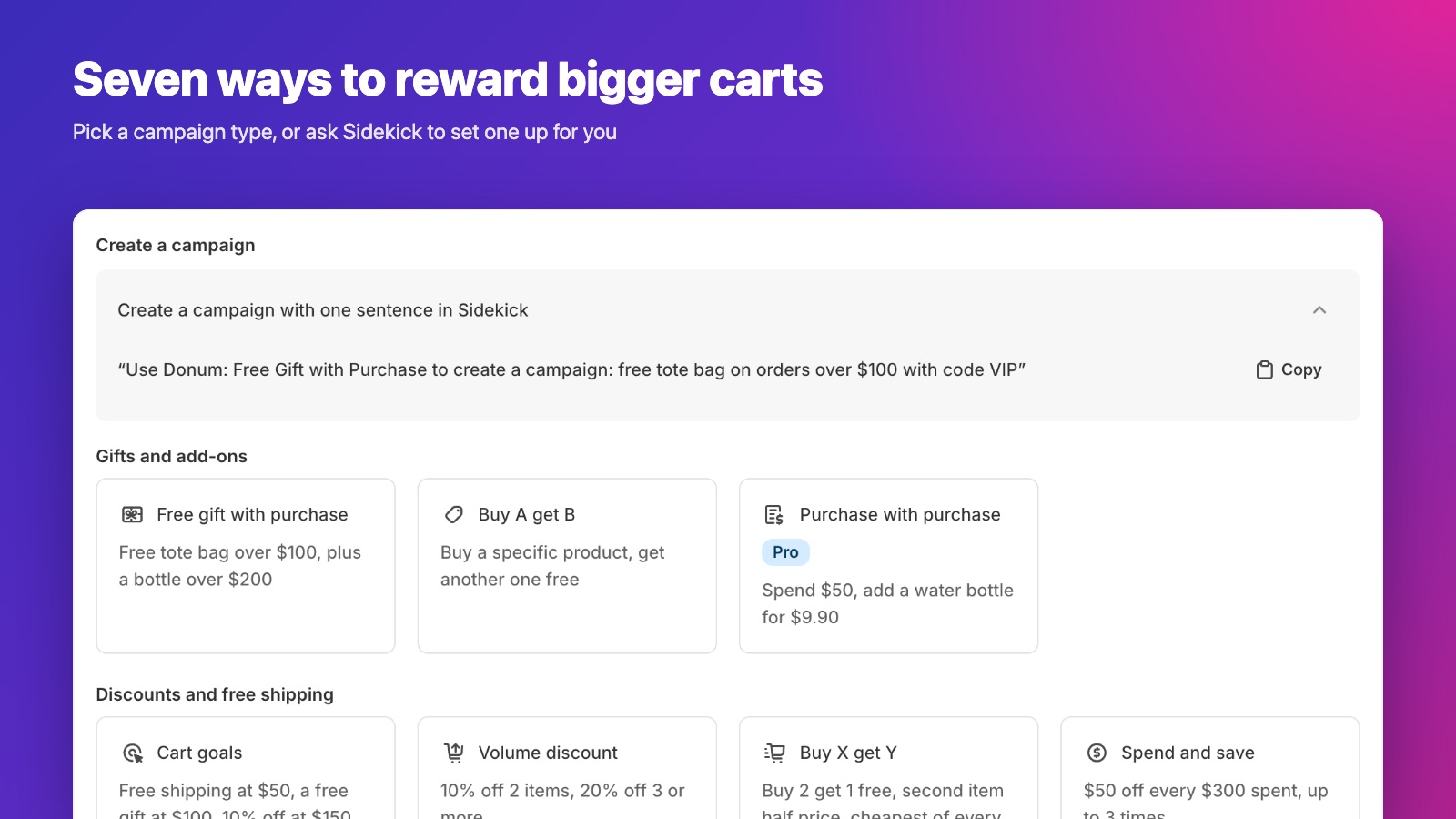
Seven ways to reward bigger carts
Every campaign can have a start and end time, can run automatically or only when shoppers enter your discount code, and can be just for new customers. Set one up in a few minutes, or describe it to Shopify Sidekick.
Free gift with purchase
Gifts are added to the cart automatically once it reaches the amount you set, or shoppers pick their own, including size and color.
Buy A get B
Buy a specific product, get another one free.
Add-ons at a special pricePro
Once the cart reaches a set amount, shoppers can add a product you choose for less. Never added automatically.
Cart goals
Unlock free shipping, a gift and a discount at different spend levels.
Volume discount
For example 10% off 2 items, 20% off 3 or more.
Buy X get Y
Buy 2 get 1 free, second item half price, and more.
Spend and save
For example $50 off every $300 spent.
Gifts in your store with Shopify POSPro
The same campaigns work at the counter. Discounts apply on their own, and the Donum tile on the POS home screen adds gifts for you.
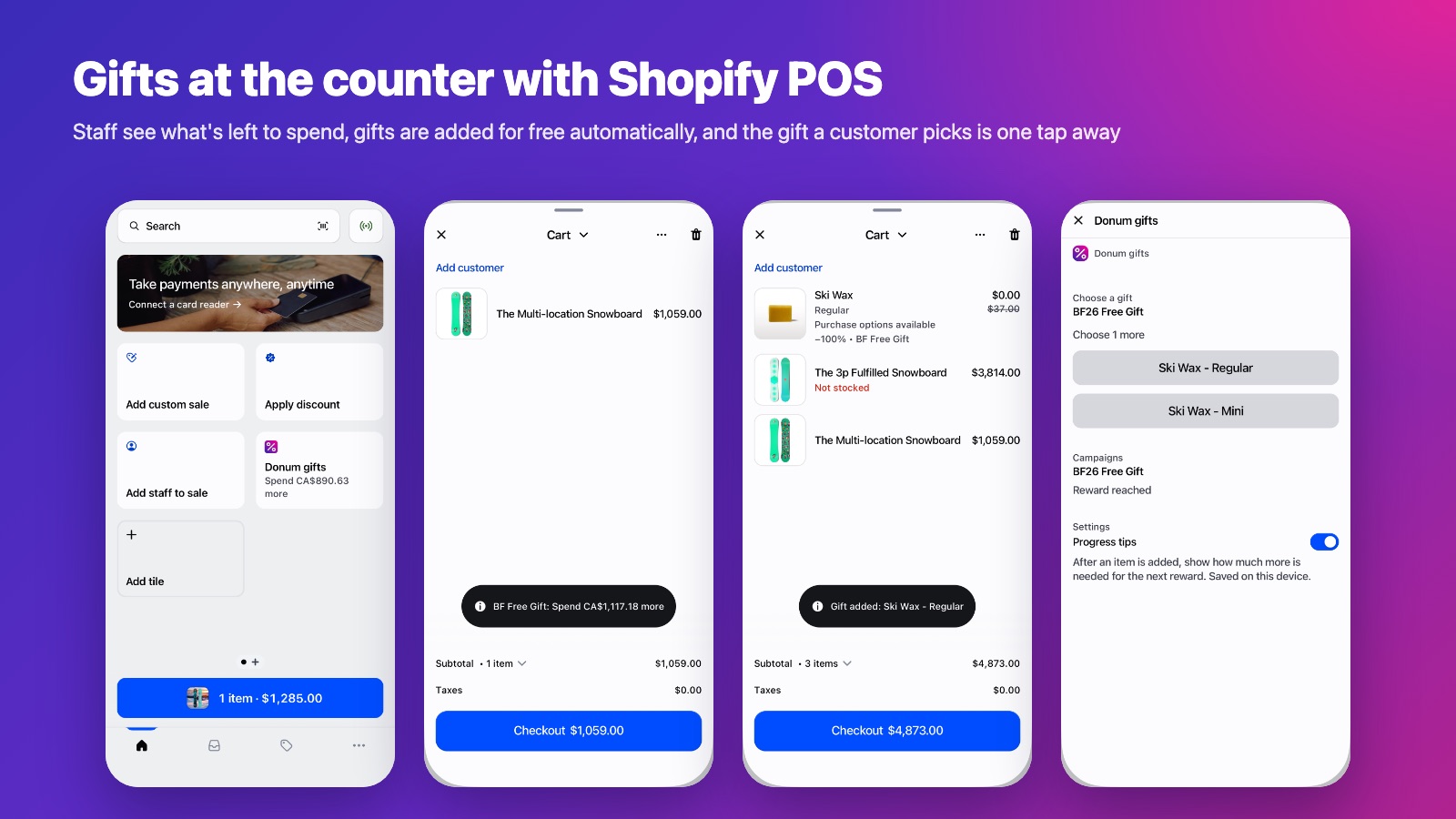
- ✓When a cart at the counter qualifies, the Donum tile adds the gift and it becomes free. If items come off and the cart no longer qualifies, the gift is removed again.
- ✓Gifts the customer chooses and add-ons at a special price are one tap away in the tile.
- ✓After each item, staff see how much more the customer needs for the next reward, so nobody has to remember the offers.
- ✓Run each campaign online and in store, online only, or in store only.
- ✓Add the tile once from your Shopify admin. Works at locations on POS Pro.
Scheduled salesPlus
Lower product prices for a set time. Shoppers see the sale price with the original crossed out everywhere: product pages, collections, search and Google Shopping.
- ✓Pick products by hand or by collection, product type, vendor or tag. Archived products are skipped.
- ✓Set a percentage off, an amount off or a fixed price, with optional rounding to .99, .95 or whole numbers. Preview the new prices first.
- ✓Prices change at the start time and go back at the end. If you change a price yourself during the sale, it's left as you set it.
- ✓Add tags while the sale runs, for a "Sale" badge or a sale collection, and show a countdown to the end on product pages.
- ✓If your selection changes during a sale, update prices in one click: products you added get the sale price, and products you took out go back to their original price.
- ✓Run sales that overlap: put a few products at a deeper discount during a bigger sale, or raise the price of products that are selling out. The sale that started last sets the price, and products go back to the earlier sale when it ends.
Build-your-own bundlesPlus
Customers build their own set on one bundle page, picking items from the collections you choose. The more they pick, the more they save.
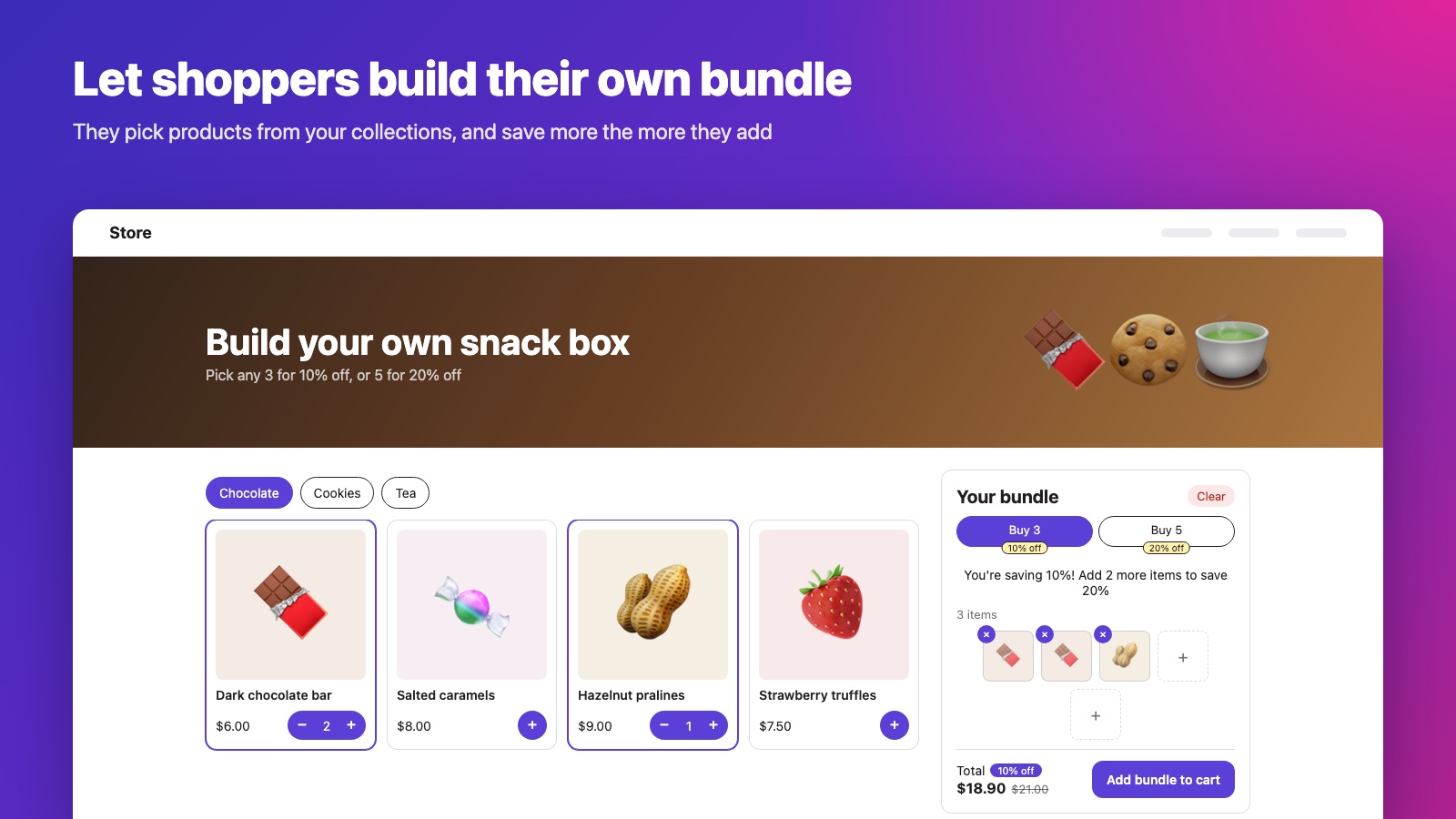
- ✓Choose up to 10 collections for customers to pick from. Each one becomes a tab on the bundle page, and products with several variants let customers pick an option.
- ✓Set the minimum and maximum items per bundle, and up to 6 discount tiers, for example 10% off 3 items and 20% off 5.
- ✓While customers pick, the bundle page shows the tiers and how many more items they need for the next discount.
- ✓In the cart, at checkout and on the order, the items are grouped into one bundle line with the discount applied.
- ✓Each item uses its own inventory, so you don't create a product for every combination. The app creates the bundle product for you.
- ✓Add a banner to each bundle, and set the bundle page's layout and colors in the theme editor, or leave them to match your theme. Your store doesn't need Shopify Plus.
Gifts you can rely on
Gifts are your real products
No duplicate $0 products cluttering your catalog or confusing your fulfillment. Gifts are labeled in the cart and on the order.
Checked again at checkout
Every gift and discount is verified at checkout, so a cart that no longer qualifies doesn't get the reward.
Sold-out gifts are skipped
When a gift runs out, we stop adding it and flag it in the app. Once it's restocked, it's back automatically.
Nothing left in your theme
The app runs as an app embed you turn on in the theme editor. No theme code to edit, and nothing to clean up if you uninstall.
Test before shoppers see it
Save a campaign as a test and try it on your live theme with a private preview link, all the way to checkout. Shoppers don't see it until you switch it on.
Theme issues are on us
If something doesn't look right in your store, report it from the preview bar in one click. The report includes your theme and cart details, and we fix it in the app instead of asking you to edit code.
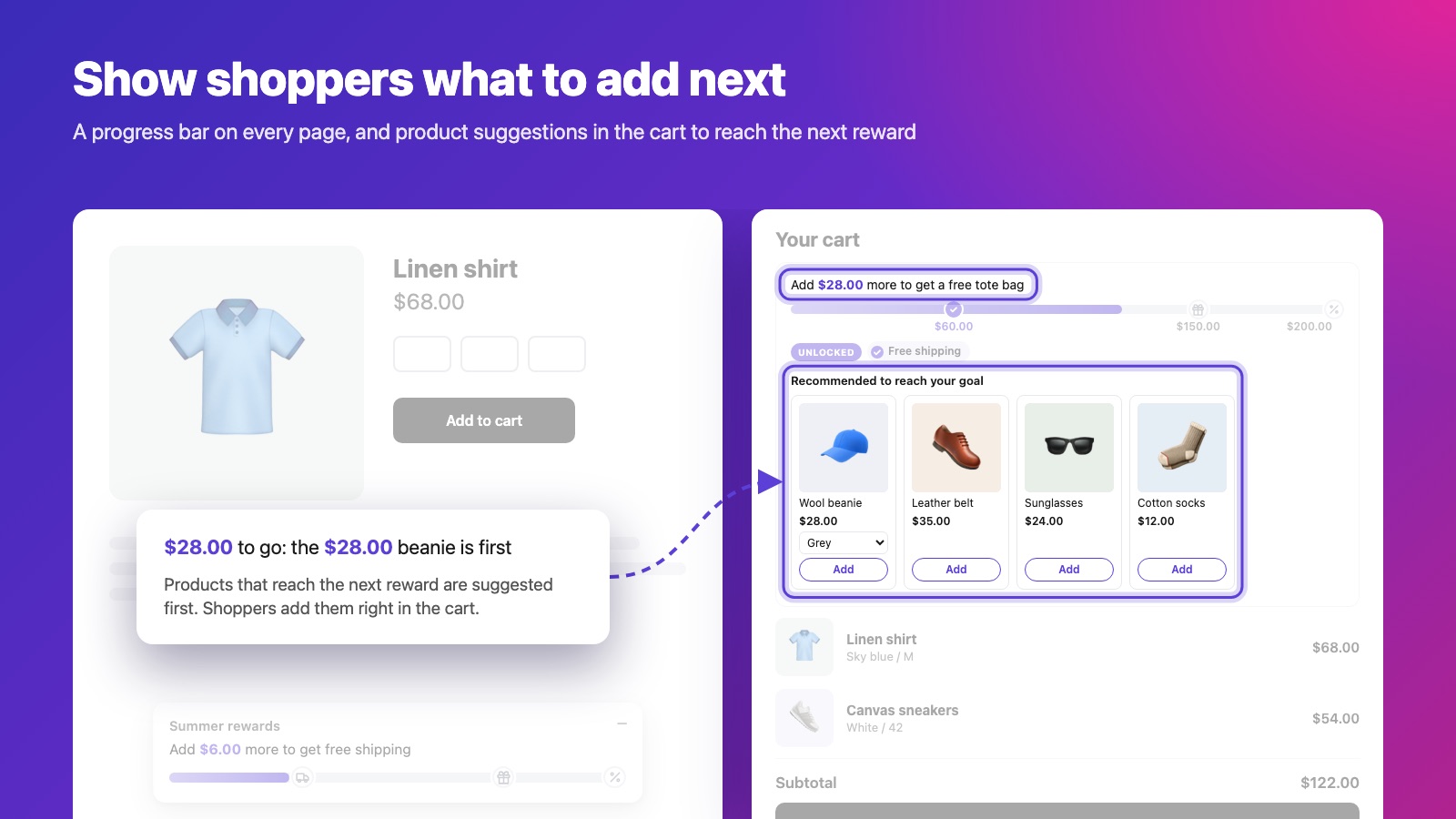
A progress bar that shows what to add next
In the cart, the cart drawer and as a floating bar on every page. It follows your theme's colors, comes in 21 languages, and you can rewrite the wording for each one. On Pro, the cart suggests products that get shoppers to the next reward.
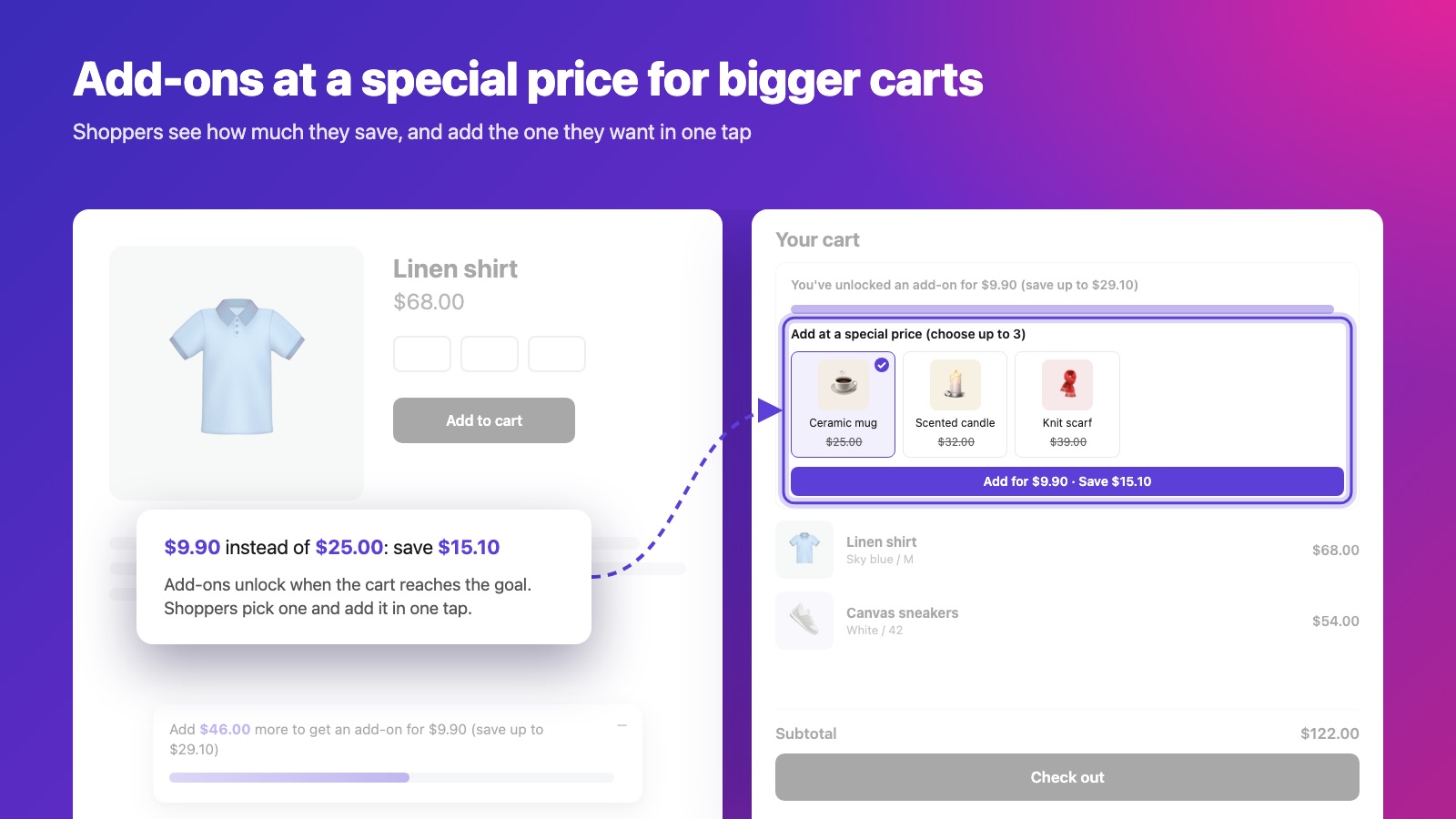
Add-ons at a special price
"Spend $50, add a water bottle for $9.90." The progress bar tells shoppers how much they can save, the cart shows the regular price crossed out, and one tap adds it.
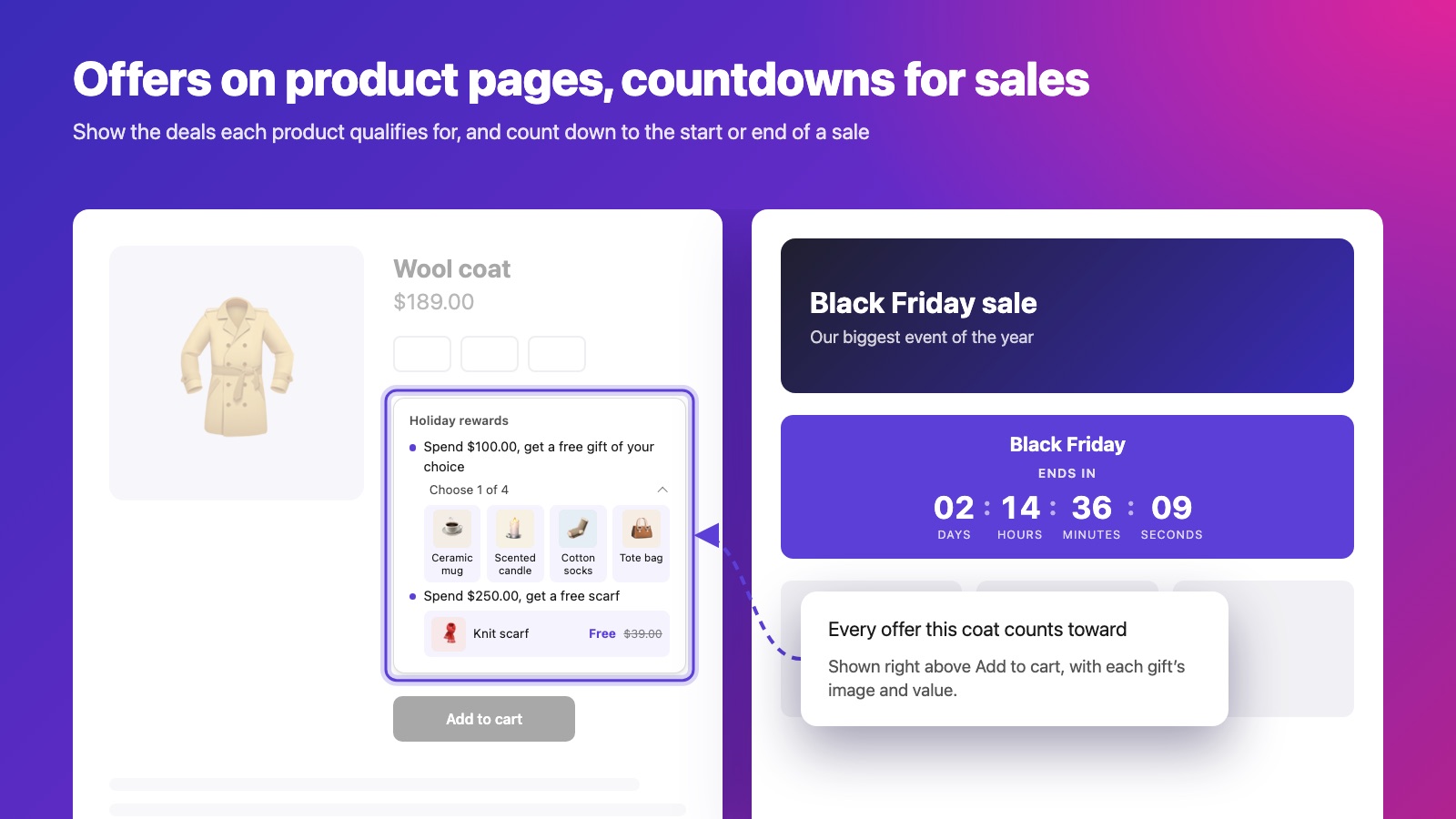
Product page offers and countdowns
Show the deals each product qualifies for right on the product page, and count down to the start or end of a campaign or the end of a scheduled sale. Add them from the Widgets page in the app.
Live in a few minutes
- 1
Install the app
Get it from the Shopify App Store and start on the Free plan.
- 2
Create a campaign
Pick a campaign type and fill in a few fields. You can preview the progress bar before saving, or describe the campaign to Shopify Sidekick.
- 3
Turn on the app embed
In the theme editor, open App embeds and turn on Auto Discount. It shows the progress bar and adds gifts to the cart.
- 4
Check your store
Open your store with the preview link and add a few products. If anything looks wrong, report it from the preview bar and we'll reply within 24 hours.
Pricing
Free
$0 forever
Try it out on your store
- ✓1 active campaign
- ✓Free gifts, cart goals, buy X get Y and more
- ✓Free gifts when shoppers enter a discount code
- ✓Exclude products and collections
- ✓Campaigns for new customers only
- ✓Storefront progress bar
- ✓Product page offers and countdowns
- ✓Create campaigns with Sidekick
Pro
$14.99 every 30 days
Includes a 14-day free trial
- ✓Unlimited campaigns
- ✓Let shoppers choose their gift
- ✓Add-ons at a special price
- ✓Product suggestions in the cart to reach the next reward
- ✓Limit campaigns to returning customers, customer tags, segments or markets
- ✓Gifts added in store with Shopify POS
- ✓Everything in Free
Plus
$24.99 every 30 days
Includes a 14-day free trial
- ✓Scheduled sales: discount product prices for a set time, restored automatically
- ✓Build-your-own bundles: customers pick products, with a bigger discount the more they pick
- ✓No limit on products per sale
- ✓Everything in Pro
FAQ
Is this the app that used to be called DS Auto gift & discount?
Yes. DS Auto gift & discount was renamed Donum: Free Gift with Purchase in October 2026. It's the same app at the same Shopify App Store link, made by Donum Studio. The old Basic and Unlimited plans have been replaced by Free, Pro ($14.99) and Plus ($24.99).
Does this change my theme code?
No. The app runs as an app embed that you turn on in the theme editor, so no theme files are edited and nothing is left behind if you uninstall.
Does it create duplicate products for gifts?
No. Gifts are your own products, so they use your real inventory. When a gift sells out, we stop adding it to carts until it's restocked.
Can a gift be added only when shoppers use a discount code?
Yes. When you create a campaign, set it to apply when a customer enters a discount code. Once the code is in the cart, the gift is added as soon as the cart meets the campaign's conditions, and removed if the code is taken off. Share the campaign's link to apply the code for shoppers, or ask them to enter it in the cart: a code entered only at checkout can't add the gift. This works on the Free plan.
Can I offer a campaign to new customers only?
Yes. In the campaign editor, set Eligibility to New customers: only customers who haven't ordered yet get the discount or gift, including first-time shoppers who check out with a new email. This works on the Free plan. On Pro, you can also limit a campaign to returning customers on a given purchase (for example their 2nd order, or their 3rd and later), customers with certain tags, specific customers, customer segments or markets.
Will it work with my other discounts?
Campaigns are Shopify discounts: automatic, or discount codes if you choose. If another automatic discount in your store can't be combined with a campaign, the campaign page tells you which one and why.
Does it work with Shopify POS?
Yes. Discounts from your campaigns apply on Shopify POS at locations on POS Pro. On the Pro plan, gifts are added too: add the Donum tile to the POS home screen once from your Shopify admin, and it adds the gift when a cart qualifies, removes it if the cart no longer does, and shows staff how much more is needed for the next reward. You choose whether each campaign runs online and in store, online only, or in store only. Campaigns that need a discount code don't add gifts in store yet, and build-your-own bundles are online only.
Does it work with my store's language?
The progress bar and cart messages come in 21 languages, including French, German, Italian, Spanish and Portuguese, and you can rewrite the wording for each language. The app itself is available in 7 languages.
What happens if a shopper removes items after getting a gift?
Every gift and discount is checked again at checkout. If the cart no longer qualifies, the reward isn't applied. Returns follow your store's usual return policy.
How does billing work?
The Free plan is free forever. Pro is $14.99 and Plus is $24.99 every 30 days, both with a 14-day free trial. Cancel during the trial and you pay nothing. Charges appear on your Shopify bill.
How are scheduled sales different from campaigns?
Campaigns are Shopify discounts applied in the cart. Scheduled sales (Plus) change the product prices themselves for a set time, so shoppers see the sale price with the original crossed out on product pages, collections, search and Google Shopping. Prices go back automatically when the sale ends.
Do bundles need Shopify Plus?
No. Build-your-own bundles are part of our Plus plan and work on every Shopify plan. Customers pick items from the collections you choose on one bundle page, and the cart groups them into one bundle line with a tiered discount. You can create a bundle and set up your theme on any plan, and upgrade when you're ready to turn it on.
Can I try a campaign before shoppers see it?
Yes. Save it as a test campaign, then open your store with the preview link from the app. The campaign works only in browsers opened with that link, including at checkout, so you can test it on your live theme. Send the link to your team so they can test too.
How do I get help?
If something doesn't work in your store, open it with the preview link and click "Something's wrong" in the bar at the top. The report includes your theme and cart details. You can also email support@donum.studio. We usually reply within 1 hour, and always within 24 hours, and we're happy to set up your first campaign with you.
Setting up or troubleshooting? Read the step-by-step guides.
See how we handle your data in the privacy policy.
From the blog
Best Free Gift with Purchase Apps for Shopify (2026): 7 Compared
BOGOS, Kite, EasyGift, Monk, TL, Fokkio and Donum compared on pricing, free plans, how gifts are added and what each is best for, so you can pick the right gift app for your store.
Pair a Slow Seller with a Bestseller on Shopify to Move Stock
Offer a slow-moving product at a special price, or free, when shoppers buy one of your bestsellers. How to pick the pair, price it, show it in your store, and what Shopify can do on its own.
How to Reward Repeat Customers on Shopify: Second-Order Gifts and Repeat-Purchase Ladders
Turn first-time buyers into repeat customers with a reward on their 2nd order, or a ladder that gets better with every purchase. What Shopify can do on its own, how to pick the reward, and mistakes to avoid.